Plan a wedding from the first budget to the final expense recap
How to Plan a Wedding with PartaBill: Budget, Guests, RSVPs, Vendors and the Big Day
A complete wedding-planning guide for coordinating the budget, vendors, instalments, guests, RSVPs, meals, seating, schedule, gifts and public wedding site.
See PartaBill in action
Video demonstration
Plan a wedding with PartaBill in 45 seconds
Read the transcript
The fictional couple first sets a wedding budget and tracks vendors, deposits and upcoming balances. They then organize guests by household and review RSVPs, meals, allergies and transportation needs. Confirmed replies become a seating plan and a wedding-day schedule with named owners. Finally, they publish a guest-facing page with the schedule, lodging, transportation and gifts while financial information, vendors, private replies and internal notes stay private.
Annotated screenshots
The 20-second answer
PartaBill is a strong choice for a couple who wants the wedding budget and the practical plan in the same shared workspace. It connects vendors, commitments, instalments, guests by household, RSVPs, meal needs, seating, tasks, the day-of schedule, gifts, group funds, documents and a guest-facing wedding page. Start with the total budget and decision owners, then build the guest list and vendor calendar before publishing anything.
The wedding essentials are free for up to 50 guest seats or covers. For a larger wedding, only the Wedding Pass removes that guest limit: it is a one-time purchase tied to one wedding group, lasts 24 months and gives that group unlimited guests plus group Plus features. The Canadian reference price checked on August 13, 2026 is CAD 24.99; the price and currency displayed by Apple or Google in the app are the ones that apply. Personal Plus and the Travel Pass do not remove the wedding guest limit.
Who this guide is for
This workflow is useful for couples, a co-manager, relatives contributing to specific costs and trusted helpers preparing a private wedding. It is designed to replace scattered spreadsheets and message threads with one current plan—not to replace an officiant, lawyer, accountant, venue, caterer, payment service or emergency plan.
PartaBill is available on iOS, Android and the Web. The four screenshots and the click-to-play video on this page are a local Web demonstration made entirely with fictitious people, replies, vendors and amounts. They show a realistic workflow without using a real couple’s information.
Free access and the Wedding Pass
| Need | Access on August 13, 2026 |
|---|---|
| Wedding group, budget, timeline, tasks, seating, guest site and up to 50 covers | Free |
| Vendor commitments | First 5 commitments in the group are free; more require Plus or the Wedding Pass |
| Payment schedule for each commitment | Up to 2 instalments per commitment are free; more require Plus or the Wedding Pass |
| AI-assisted contract reading | First read in the group is free; further reads require Plus or the Wedding Pass and remain subject to the limits shown in the app |
| Wedding with more than 50 covers | Wedding Pass only |
| Wedding Pass | One purchase for one wedding, 24 months, unlimited guests and group Plus features |
Buying personal Plus or holding a Travel Pass does not raise the 50-cover threshold. Check the store screen before purchase: CAD 24.99 is a Canadian reference price, while taxes, currency and localized store pricing can differ. A pass organizes records and access; PartaBill does not book suppliers or transfer money.
A complete 11-step wedding workflow
1. Agree on scope, ownership and decision rules
Create the Wedding group and add the date, city, working budget and only the people who genuinely need planning access. Give the other partner co-manager access so neither person becomes the information bottleneck. Decide who owns vendors, guests, design, transportation and the day-of plan, and record decisions in the group instead of relying on memory.
If family members contribute, agree first on the amount, what it covers and what information they may see. The Financial Consumer Agency of Canada recommends open discussion of income, expenses, debts and goals when couples plan finances. A wedding budget is easier to govern when each contribution and responsibility is explicit.
2. Build a budget that includes the unglamorous costs
Set the total ceiling before comparing proposals. Create categories for venue, food and beverages, attire, photography, music, flowers and decor, stationery, transportation, accommodation support, ceremony fees, gratuities, taxes and a contingency. Record expected family contributions or other income separately from costs.
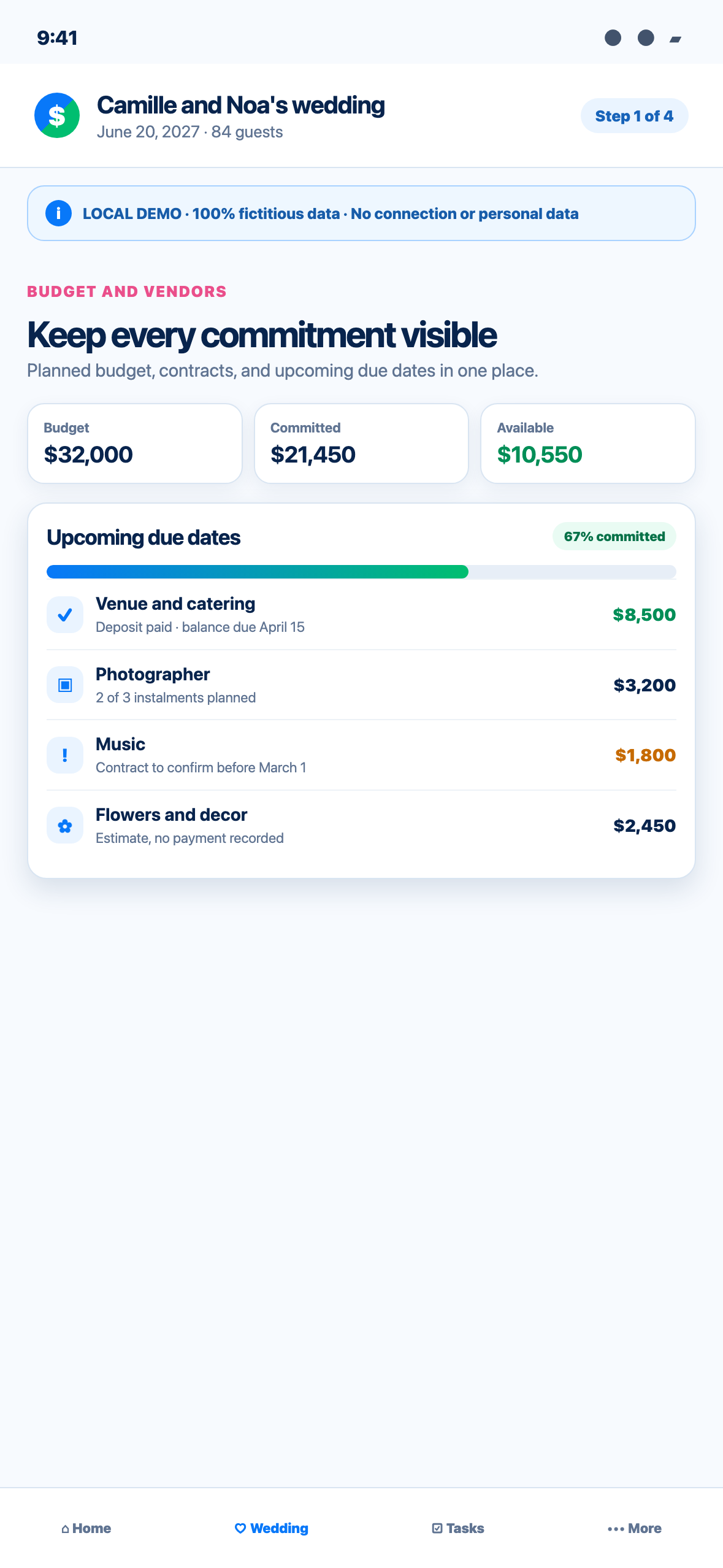
Use the dashboard to compare the budget, committed amount and remaining room. An estimate is not a commitment, and a commitment is not necessarily paid. Keep those states distinct so a deposit does not make a supplier look fully settled. PartaBill calculates from what the group records; it cannot detect a forgotten cash payment or a price change in a supplier’s system.
3. Turn every vendor promise into a dated commitment
For each serious vendor, record the supplier, category, total, status, contact and next date. The first five commitments are free. Add up to two free instalments—typically deposit and balance—to each one. A third or more detailed schedule requires Plus or the Wedding Pass.
The group’s first AI-assisted contract read is free. It can extract candidate names, categories, totals and source sentences for review, but it does not decide what the contract means and never creates a deposit by itself. Verify every amount, cancellation clause and date against the signed original. Further reads require Plus or the Wedding Pass. This is organizational assistance, not legal advice.
4. Create households before sending invitations
Build the guest list by household and reserve the correct number of seats for each invitation. This avoids treating a family of four as one guest or accidentally offering an unnamed plus-one. Record which moments each household is invited to, such as ceremony, dinner or brunch, and set a clear response deadline.
Up to 50 covers are included free. If the planned list is larger, activate the Wedding Pass before expanding it. Existing invitees’ replies should remain part of the record, but the organizer needs the correct entitlement to manage a list beyond the free threshold.
5. Ask only the questions you will actually use
Set meal options before inviting people so their selections arrive with their RSVP. Ask about dietary needs, accessibility, children, shuttle interest or another essential question only when someone will act on the answer. Give guests a way to describe a need that fixed choices do not capture.
Inclusive planning is more than adding a ramp at the end. Check entrances, washrooms, seating, sound, lighting, quiet space, language, dietary choices and transportation early enough to change the plan. The Government of Canada’s inclusive-event guidance and the W3C principles—perceivable, operable, understandable and robust—provide useful checks for both the physical event and digital information.
6. Share each reply link deliberately
Each household can use its own link to answer without installing the app or creating an account. The couple prepares and shares that link using its chosen email or messaging service. PartaBill does not automatically send wedding invitation emails. Confirm the recipient before sending, avoid posting personal links publicly and revoke a link if it reaches the wrong person.
Explain why you request contact, meal, allergy or transportation information, how it will be used and who needs access. Canada’s privacy regulator emphasizes meaningful consent and understandable choices. Collect the minimum, restrict planning access and remove exports or working copies that are no longer needed.
7. Follow RSVPs without losing the human touch
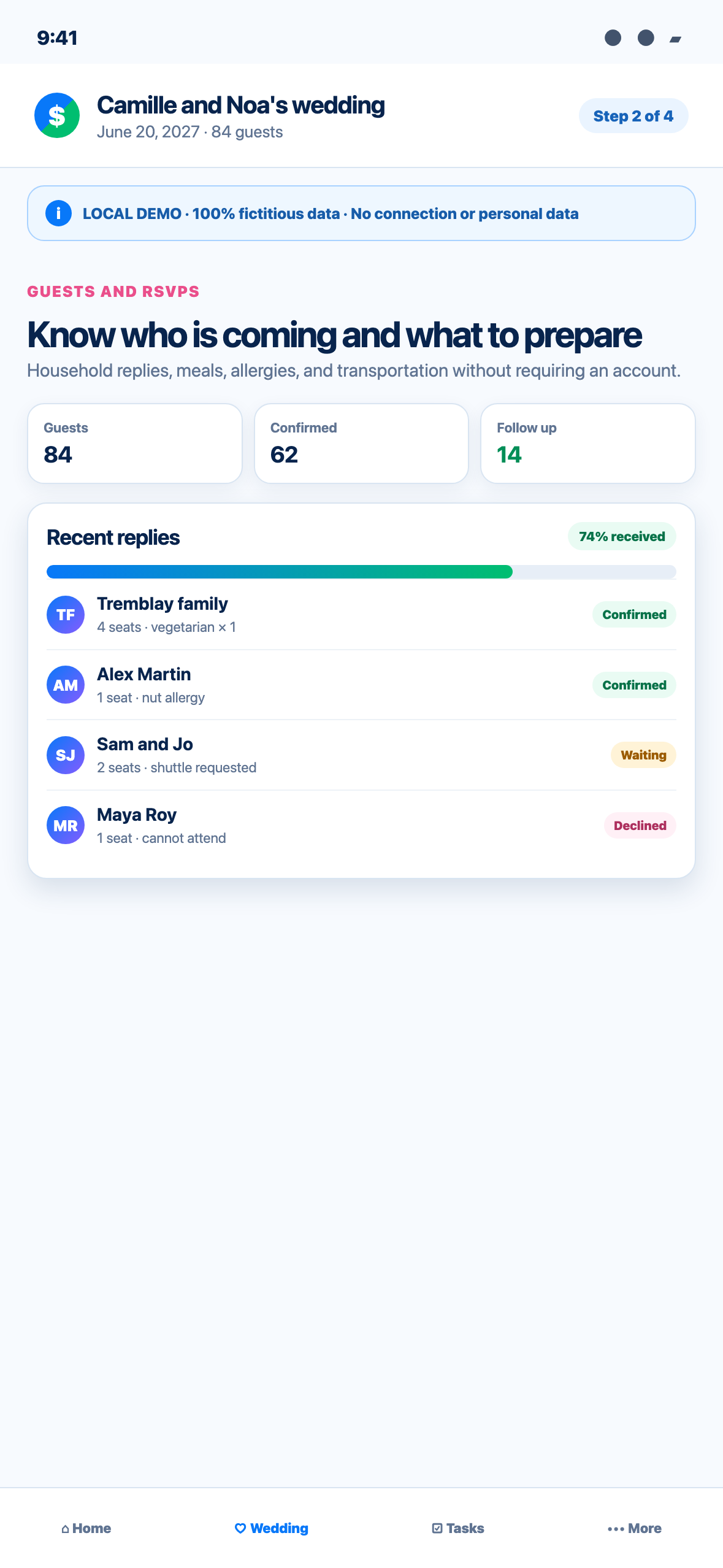
Review confirmed, declined and unanswered households, along with meal and transport totals. Follow up personally when a deadline passes; a status is not proof that someone saw the invitation. Keep late changes in PartaBill so the caterer count, seating plan and shuttle estimate share the same source.
Never copy health details into a public note, general chat or seating card. Share dietary or accessibility information only with the people who must accommodate it, and use a name or table reference rather than broadcasting the entire guest profile.
8. Convert confirmations into tables and a safe return plan
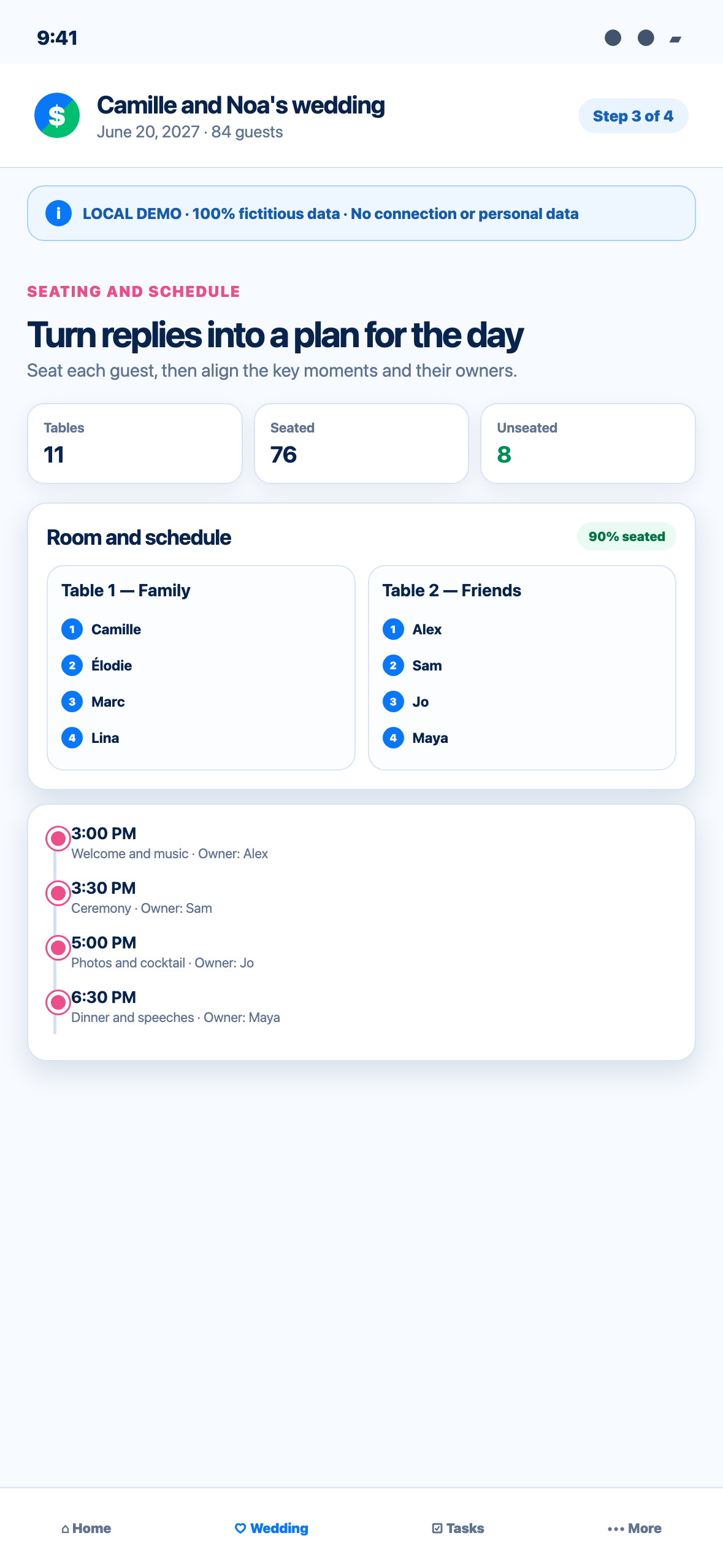
Create tables with their real capacities, then seat confirmed attendees. Keep households together where appropriate, respect access and mobility needs, and leave room for service paths and venue rules. A declined guest frees a place, but confirm the final count with the venue before changing a contract.
Use shuttle responses and carpool information to estimate transportation, then confirm the actual provider, capacity, pickup points and responsible contacts outside the app. If alcohol is served, plan designated drivers, taxis, public transit, lodging or shuttles before the celebration. The SAAQ recommends arranging a safe way home rather than improvising after drinking. PartaBill coordinates intentions; it neither dispatches transport nor guarantees a ride.
9. Build the timeline, tasks and document trail
Start from the wedding timeline, adjust due dates to the real date and assign one owner to every critical item. Add the day-of sequence—access, setup, ceremony, photos, meal, speeches, teardown—and name a backup for essential roles. Keep contracts, receipts, floor plans and confirmations in clearly labelled folders, subject to the access level shown in the app.
For a Quebec marriage, administrative and legal steps remain separate from event planning. The Government of Quebec describes the documents and information required before the meeting with the officiant. Check the current rules for the jurisdiction where the marriage takes place; PartaBill does not validate eligibility, notices, licences or legal deadlines.
10. Publish a guest page with a strict privacy boundary
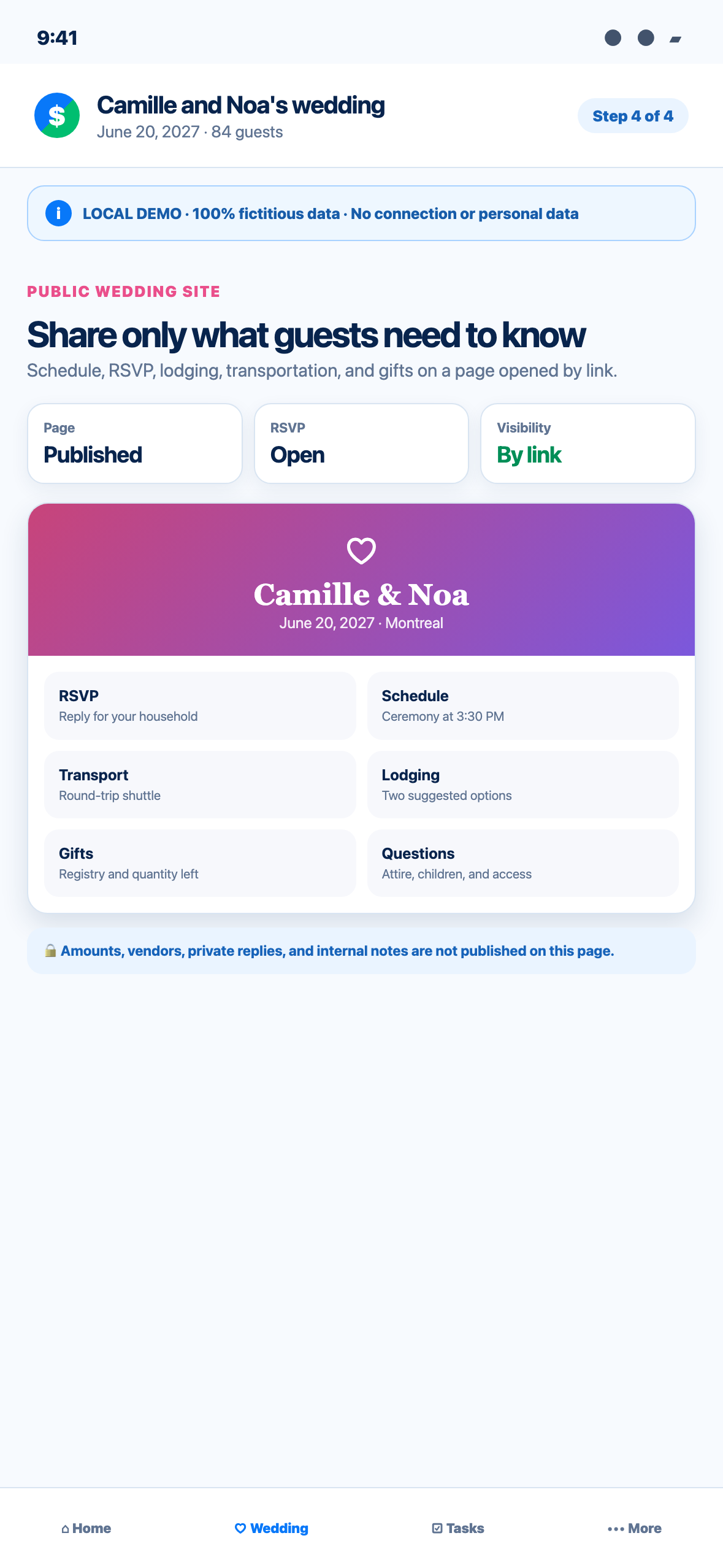
Preview the wedding site before turning publication on. Include only what guests need: welcome text, schedule, venue directions, lodging suggestions, transportation, frequently asked questions, RSVP and optional gift information. Test the link on a phone, zoom the page, navigate with a keyboard and review headings and contrast.
Do not publish internal budgets, vendor amounts, private replies, allergy details, phone lists or planning notes. The page opens by link, so treat the address as shareable rather than secret. PartaBill does not reserve lodging, send money or guarantee that every recipient keeps the link private.
11. Run the wedding day and close the records afterward
Before the day, export or share only the operational views each person needs: the coordinator’s schedule, the caterer’s approved meal count and seating plan, the transport contact sheet and the couple’s due-payment list. Reconfirm vendors directly. Keep an offline copy of essential addresses and phone numbers because complete collaboration is not guaranteed without connectivity.
Afterward, record final invoices, tips, refunds, gift contributions and payments, then compare the final total with the budget. PartaBill shows balances and payment status but does not move funds. Settle through a mutually agreed external method, preserve documents needed for warranties or disputes and delete unnecessary working copies containing guest information.
The 45-second click-to-play demonstration
The video starts only when selected, is silent by default and includes English captions.
0–11 seconds — Budget and vendors. The fictional couple sets a CAD 32,000 budget, reviews committed spending and checks deposits and upcoming balances.
11–22 seconds — Guests and RSVPs. Households move through confirmed, waiting and declined states while meal, allergy and shuttle needs remain connected to their replies.
22–33 seconds — Seating and schedule. Confirmed guests are placed at fictional tables, and four wedding-day moments are assigned to named owners.
33–45 seconds — Public wedding site. The couple publishes RSVP, schedule, lodging, transport, gifts and practical questions while financial details, vendors, private replies and internal notes stay off the page.
Frequently asked questions
Can guests reply without PartaBill?
Yes. A household can open its personal reply link in a browser without an app account. The organizer shares the link; PartaBill does not automatically send the invitation email.
Is the complete wedding workspace free?
Core planning and up to 50 covers are free. The first five vendor commitments, two instalments per commitment and the first group contract read are free. Larger quantities require Plus or group access as described above; only the Wedding Pass removes the 50-cover guest limit.
Does personal Plus allow more than 50 wedding guests?
No. Neither personal Plus nor the Travel Pass raises that limit. A wedding beyond 50 covers requires the one-time Wedding Pass tied to that specific wedding.
Does PartaBill send invitations or reminders automatically?
It provides household reply links and planning status. The couple remains responsible for sending invitations and follow-ups through its own communication channel and confirming delivery.
Can PartaBill sign contracts, book vendors or make payments?
No. It records commitments, instalments, expenses and payment status. Contract interpretation, supplier booking and money transfers happen outside PartaBill.
Is the public wedding page private?
It is shared by link, not a vault. Publish only guest-facing information, distribute household links carefully and keep budgets, contracts, private replies and internal notes out of public sections.
Does this guide cover the legal steps for marriage?
No. It is a planning workflow. Confirm the current legal process with the competent authority and your officiant in the place where the marriage will occur.
Evidence, verification and known limits
This guide was researched and reviewed on August 13, 2026. PartaBill functions, access limits and the Canadian Wedding Pass reference price were checked against the current product and official PartaBill pages. Budget, consent, inclusion, accessibility, Quebec marriage-process and safe-transport guidance was checked against the government and W3C sources listed on this page.
First version assisted by AI, research and final review by Denis Turbide.
The four screenshots, 45-second video, poster, captions and transcript were verified on August 13, 2026 from a local Web demonstration using only fictitious data. Store price and currency may vary by country and platform. PartaBill cannot guarantee a supplier, contract interpretation, legal compliance, transport, delivery of a message or network availability.
Start with one useful wedding plan
Create the group with your partner, enter the budget, add one fictional vendor and one test household, then preview the guest page before importing or inviting anyone. That short rehearsal exposes unclear roles and privacy choices while they are still easy to correct.
Explore wedding planning in PartaBill
Related guides

About the author
Denis Turbide
creator of PartaBill
Revision history
- — Initial publication
Sources and verification
- PartaBill — Wedding planning Facts verified: August 13, 2026
- PartaBill features Facts verified: August 13, 2026
- PartaBill support and wedding FAQ Facts verified: August 13, 2026
- Financial Consumer Agency of Canada — Living as a couple Facts verified: August 13, 2026
- Government of Canada — Inclusive event planning Facts verified: August 13, 2026
- Office of the Privacy Commissioner of Canada — Guidelines for obtaining meaningful consent Facts verified: August 13, 2026
- Quebec Director of Civil Status — Publication of a marriage notice Facts verified: August 13, 2026
- SAAQ — Responsibilities and smart solutions concerning alcohol Facts verified: August 13, 2026
- W3C Web Accessibility Initiative — Accessibility principles Facts verified: August 13, 2026
Try PartaBill with your own group
Create a group, add an expense, and see what PartaBill can simplify for you.