Organize a group bike tour from the first route proposal to the final expense recap
How to Organize a Group Bike Tour with PartaBill: Routes, Stages, Lodging and Luggage
A practical eight-step guide to coordinate a group bike tour with daily stages, shared routes, rider registration, lodging, meals, luggage, carpools and expenses.
See PartaBill in action
Video demonstration
Plan a group bike tour with PartaBill in 45 seconds
Read the transcript
A fictional four-day tour is framed with dates, pace and elevation targets. Daily stages and a reviewed route appear next, followed by rider registration and lodging assignments. The final screens show a delivered bag and the group expense estimate. The demonstration ends by reminding viewers to use a specialist GPS app for navigation and to verify routes, weather and road conditions before departure.
Annotated screenshots
The 20-second answer
PartaBill brings the group side of a bike tour into one place: daily stages, route proposals, rider registration, lodging, meals, luggage transfers, carpools, shared expenses and a roadbook. Start by agreeing on the group’s pace and climbing limits, then assign a reviewed route and logistics to each day. Use a specialist cycling app or GPS device for turn-by-turn navigation.
For a group created on or after August 11, 2026, up to four people can participate without the organizer needing PartaBill Plus. If a fifth person joins, the group owner needs Plus; invited riders do not pay to join. Individual advanced features outside the bike-touring tools may still follow their own Plus limits.
Available in PartaBill
The Bike touring group is available in PartaBill on iOS, Android and the Web. The screenshots and video use a phone-sized local Web demonstration with fictional people, routes, reservations and amounts. They explain the workflow without exposing personal data.
What PartaBill helps the group coordinate
A multi-day ride is more than a line on a map. PartaBill keeps these decisions connected:
- a tour profile with dates, region, bike type, target kilometres per day, maximum climbing per day, preferred lodging, support vehicle and group notes;
- a daily roadbook with locations, times, distance, elevation gain and stage status;
- routes the group can calculate, import from GPX or TCX, propose and vote on before a manager attaches one to a stage;
- rider capacity, self-registration, a waiting list, bike or e-bike details, charging needs and bike-transport requirements;
- lodging capacity and assignments, meal attendance and dietary information;
- luggage transfers and carpools that distinguish passenger seats from bike capacity;
- shared expenses, registration amounts, per-person estimates and a roadbook PDF.
PartaBill records plans, balances and payment status. It does not book rooms, transfer money or connect to a bank account.
Free and Plus: the honest version
The five dedicated Bike touring tools—stages, routes, riders, lodging and luggage—do not have their own individual Plus lock.
| Situation | Access |
|---|---|
| Create and prepare a new Bike touring group | Free |
| Invite up to four people in total, including the organizer | Free |
| Add a fifth person or more to a group created on or after August 11, 2026 | The group owner needs Plus |
| Join a group as an invited rider | Free for the rider |
| Create additional general-purpose lists or use other advanced tools | May require Plus after the allowance shown in the app |
For groups created on or after August 12, 2026, invitations are managed by the organizer or a co-manager. Older groups retain the rules that applied when they were created.
A practical eight-step workflow
This example uses fictional data for a four-day Québec City to Rivière-du-Loup ride: 335 km and 1,820 metres of climbing. It is not a recommended or verified route.
1. Frame the tour before drawing routes
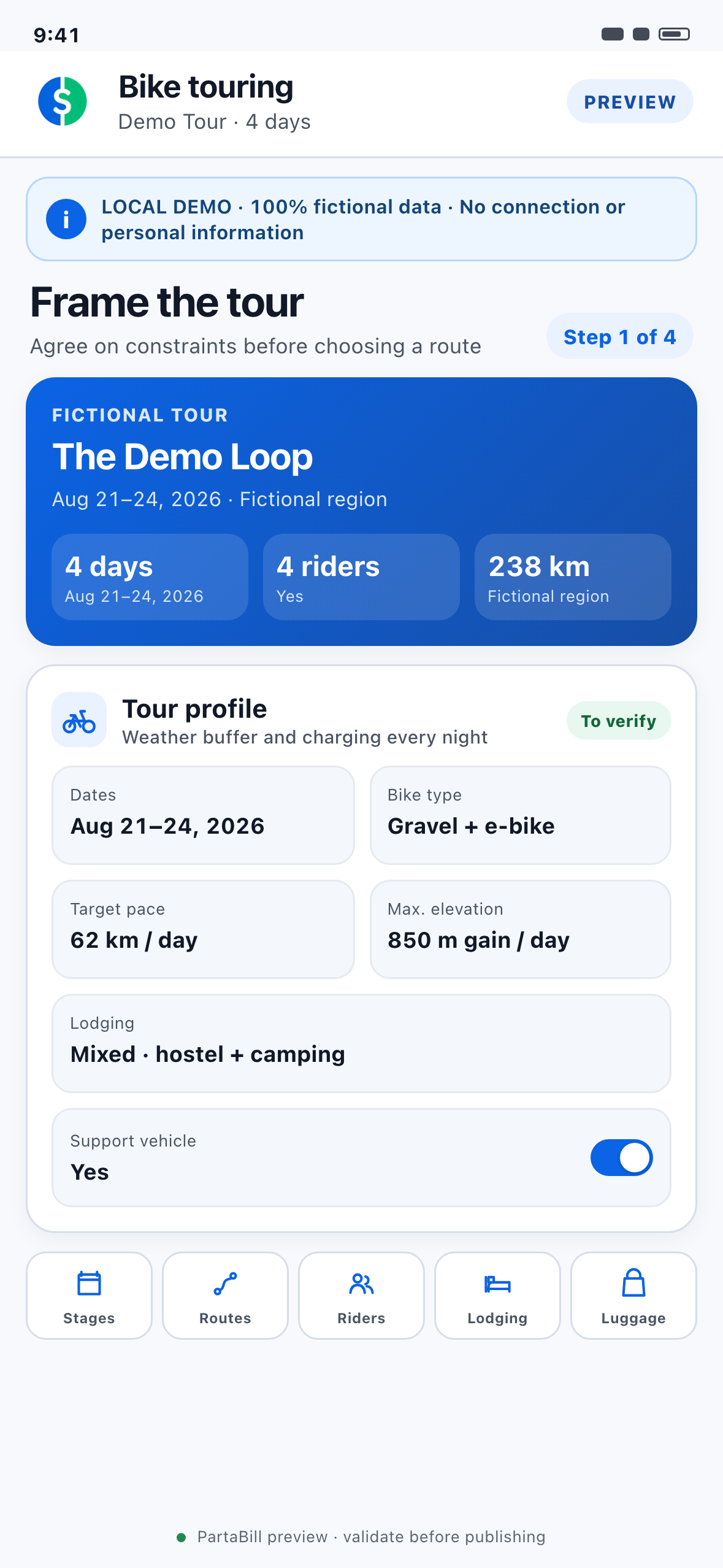
Create a Bike touring group and enter the dates, region, bike type, target distance, maximum elevation gain, lodging preference and support-vehicle plan. Treat these as decision criteria, not promises. A mixed group of conventional bikes and e-bikes may need shorter stages or charging stops.
2. Build one stage for each riding day
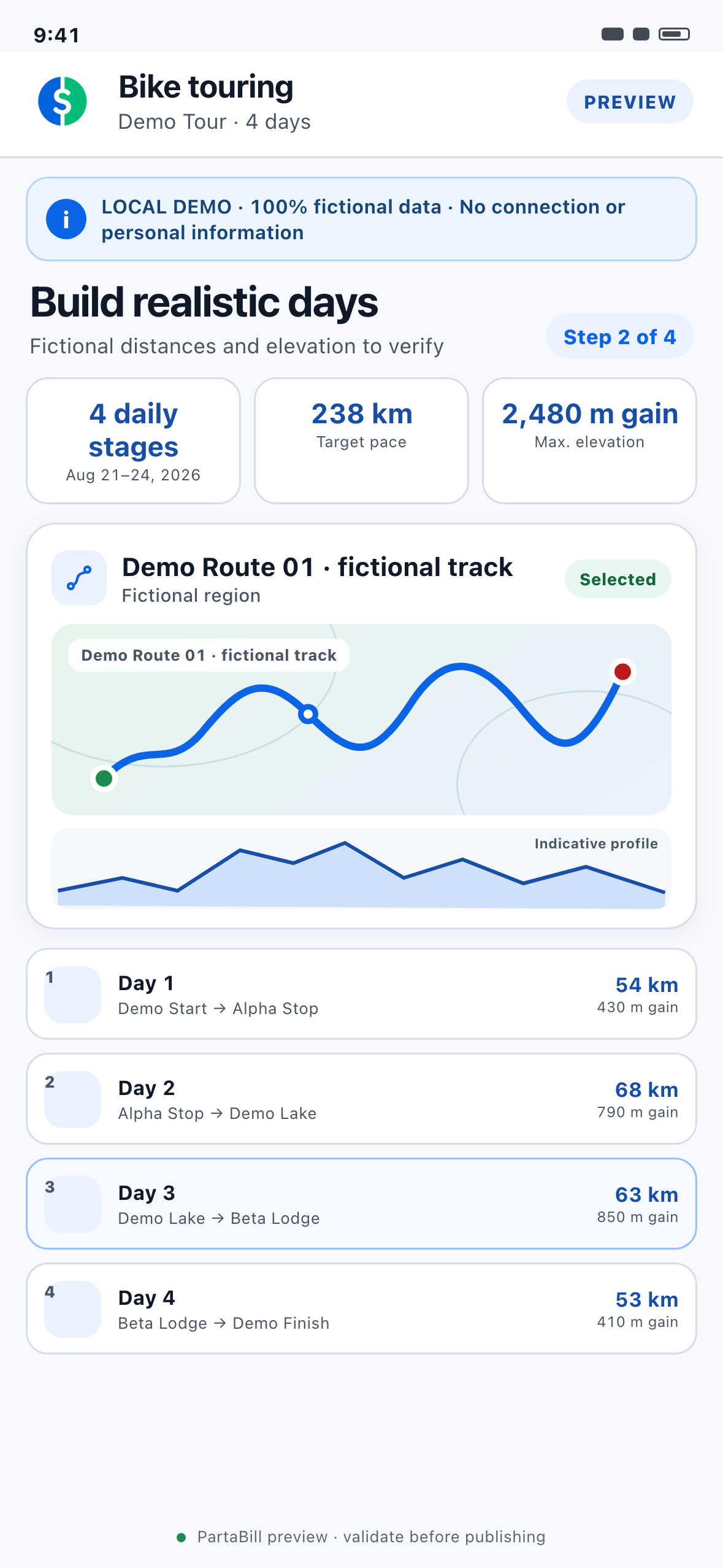
Add each day with its start, finish, expected times, distance and elevation gain. A stage can be planned, modified or cancelled. Include the meeting point, night’s address and essential group note so riders do not need to search old messages.
3. Calculate, import and compare route proposals
Calculate a cycling route from the endpoints, import a GPX or TCX file, or paste a public route link. Each proposal keeps its source, distance, elevation and notes. Members can vote; a manager attaches the selected proposal to the day. Review the map, surface and elevation—not distance alone. A route file does not prove that every road is open, legal or safe.
4. Put the selected route in a specialist navigation tool
PartaBill is not turn-by-turn navigation. Komoot and Ride with GPS are complementary route and navigation tools; Garmin and other compatible devices can carry the route. GPX and TCX import works on Web, iOS and Android, while GPX export is limited to iOS and Android. Load the final route into the chosen tool and, when that service offers offline maps, download and test them on the device riders will use.
5. Open registration and confirm the riders
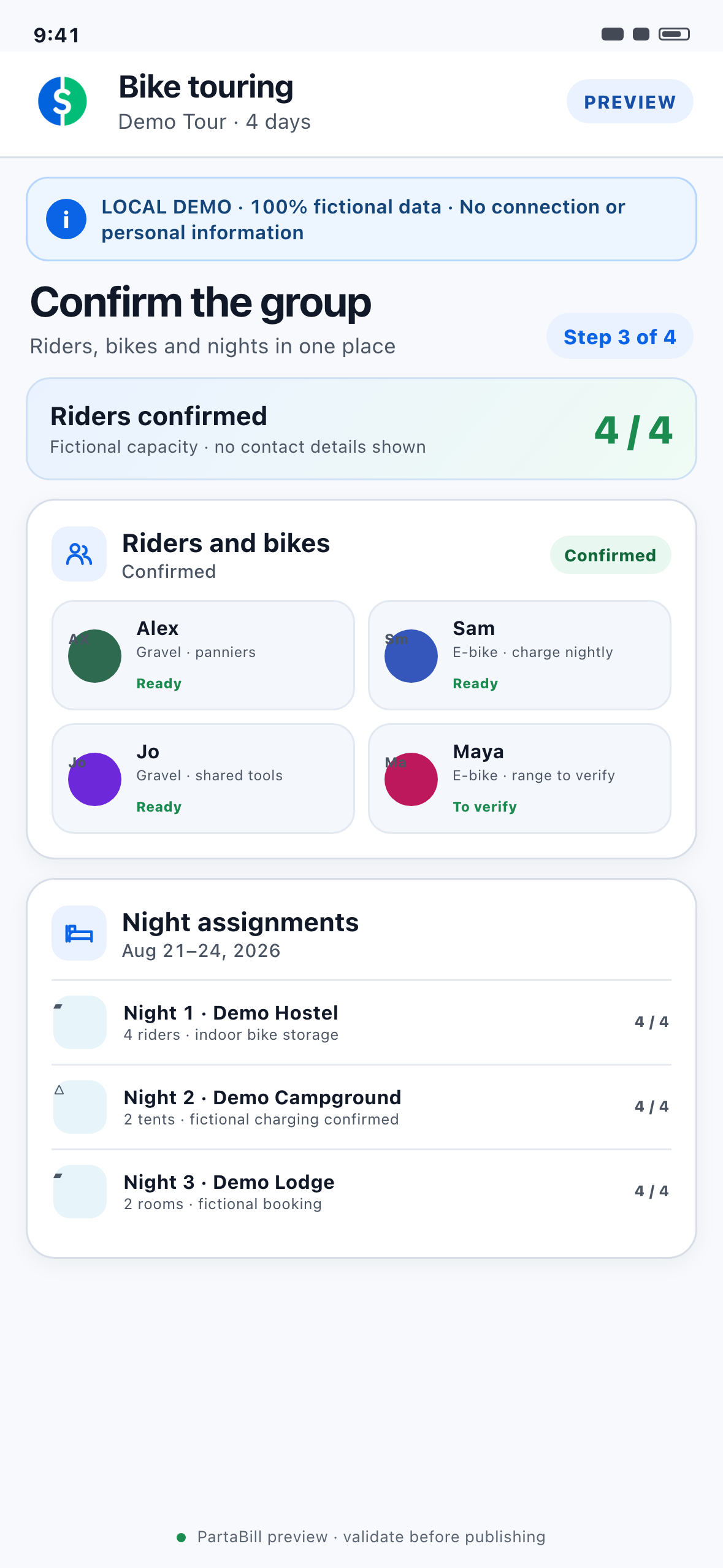
Set capacity and open registration. Extra registrations enter a waiting list; when a place opens, the next eligible person can be promoted automatically. Collect only needed information: bike type, e-bike range and charging, bike transport, dietary restrictions and emergency contact. Private details are for managers. Registration fees can be recorded as expected, partial, received or refunded, but PartaBill does not process them.
6. Assign lodging and confirm meals
Add each hotel’s, hostel’s, campground’s or rental’s capacity, estimated cost, address and reference, then assign rooms, beds or sites. The group can instead record that everyone books independently. For meals, collect attendance and dietary notes; until everyone answers, use a headcount range. PartaBill records reservations but does not make them.
7. Plan luggage transfers and carpools
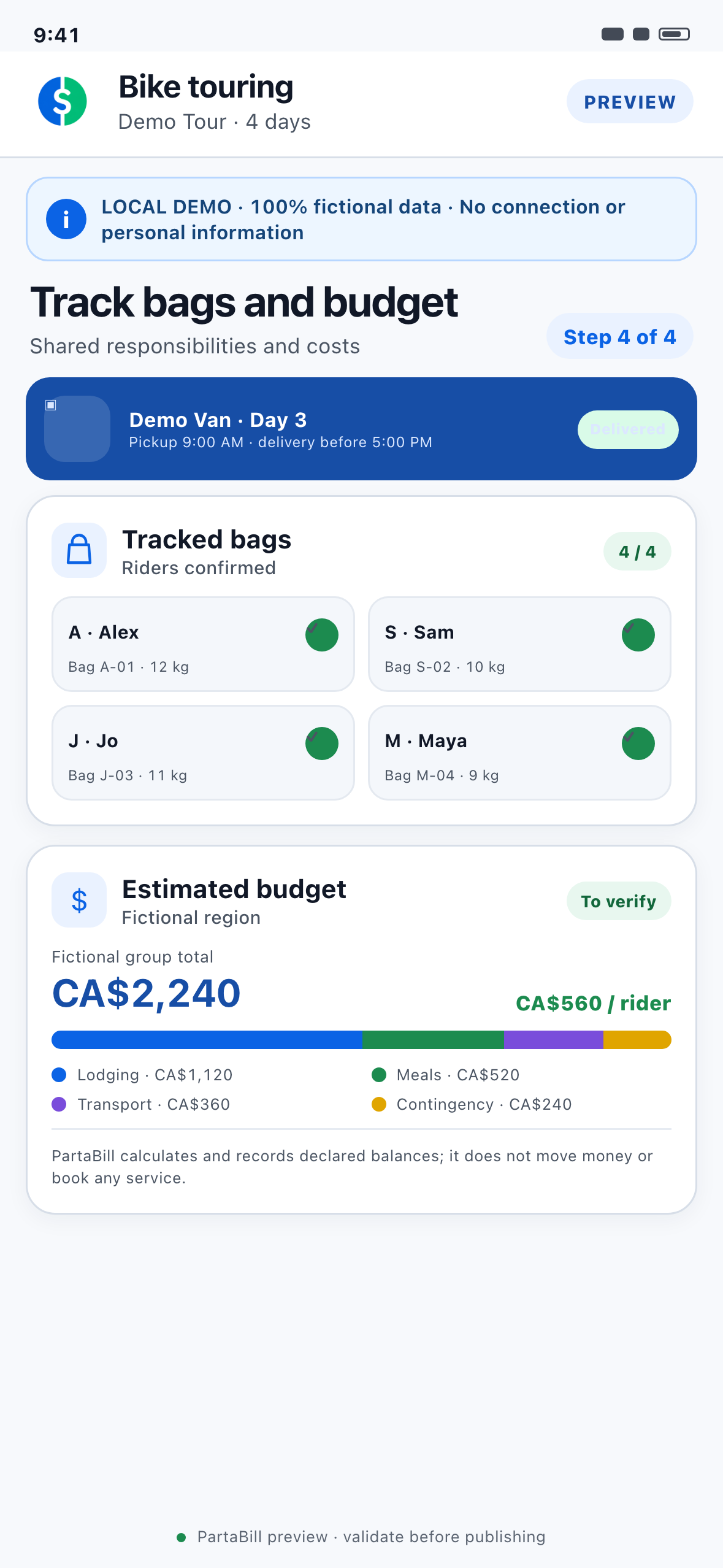
For a support vehicle, record the driver, bag capacity, stage, pickup and delivery times. Label bags and update them from loaded to in transit to delivered. For carpools, enter both seats and bike capacity—a free seat does not imply space for a bicycle. Drivers must verify the real load and secure it safely.
8. Follow the day and close the budget
Use today’s stage, lodging and luggage information as the shared reference. Stage changes, route proposals, waiting-list promotions and delivered bags can generate notifications. Record expenses as they occur and review the per-person estimate. PartaBill flags missing inputs but cannot include an unrecorded cost. The final balances show who owes what; members pay through their preferred method.
The 45-second click-to-play demonstration
The video is silent by default, starts only when selected and includes English captions.
0–11 seconds — Frame the tour. The organizer records dates, pace, elevation, lodging and a support vehicle for the fictional four-day trip.
11–22 seconds — Build the days. Four stages appear; the organizer reviews a route’s map and elevation and attaches it to a day.
22–33 seconds — Confirm people and nights. The organizer reviews capacity and assigns riders to lodging without displaying private details.
33–45 seconds — Follow bags and costs. A bag becomes delivered and estimated shares appear. The final frame says to verify conditions and use specialist navigation.
Safety checks before every departure
No screen replaces rider judgement or highway rules. Vélo Québec recommends adapting equipment to duration, route, season, terrain and autonomy, while accounting for food, lodging, water and repairs.
Before every stage:
- check closures, construction, ferries, surfaces and access rules;
- review weather and define when to shorten, reroute or cancel;
- inspect tires, brakes, chain, lights and attached loads;
- carry water, food, repair and first-aid kits, suitable clothing, identification and appropriate communication;
- confirm meeting, regrouping and emergency plans;
- verify legally required bicycle equipment in every jurisdiction crossed.
In Quebec, the SAAQ lists mandatory reflectors and requires a white front light and red rear light in darkness. Check the competent authority elsewhere.
Network, offline and platform limits
Plan for poor reception; the complete Bike touring workspace is not available offline.
- Creating or changing group information requires Internet synchronization.
- Route calculation, place suggestions, nearby-lodging search and weather information rely on online external services.
- A previously loaded stage list may remain cached, but there is no complete downloadable offline Bike touring package.
- GPX and TCX import is supported on Web, iOS and Android. GPX export is supported on iOS and Android, not on Web.
- Routes, elevation, places and forecasts can be incomplete, unavailable or outdated because they depend on external data.
Download routes and offline maps in a specialist app before leaving service. Ride with GPS says offline routes must be downloaded in advance and may depend on its subscription rules. Test with airplane mode before departure.
Frequently asked questions
Does PartaBill provide turn-by-turn directions?
No. PartaBill keeps the route connected to the group’s stage, votes and logistics. Use Komoot, Ride with GPS, Garmin or another specialist navigation tool for directions while riding.
Can the group import an existing GPX or TCX route?
Yes, on Web, iOS and Android. A public route link can also be proposed. Check the track, distance and elevation before selection.
Can I export the selected route?
GPX export works on iOS and Android, not on Web. Test compatibility with the receiving app or GPS device.
Does the complete workflow work without mobile service?
No. A cached stage list may help, but collaboration and external services require connectivity. Prepare navigation, addresses and emergency information separately.
Can PartaBill reserve lodging or restaurants?
No. It records options, capacity, costs, references, assignments and meal responses. Booking remains with the provider.
Does PartaBill collect registration fees or reimburse riders?
No. It records payment status and calculates balances; it neither transfers money nor connects to a bank.
Who needs Plus when the group has more than four people?
For a group created on or after August 11, 2026, the owner needs Plus when a fifth person joins. Invited riders remain free.
Can any rider invite more people?
For groups created on or after August 12, 2026, invitations are reserved for the organizer and co-managers.
Is the weather forecast guaranteed?
No. Consult current official forecasts and make a new go/no-go decision before each stage.
Proof, verification and known limits
This guide was researched and reviewed on August 12, 2026. PartaBill behaviour was checked against the current implementation and public feature pages. Preparation and equipment guidance was checked against Vélo Québec and the SAAQ; navigation descriptions were checked against official Komoot and Ride with GPS documentation.
First version assisted by AI, research and final review by Denis Turbide.
The four screenshots, 45-second video, captions and three localized versions were produced and verified on August 12, 2026 from a local Web demonstration using only fictional data. PartaBill cannot guarantee external routing, mapping, place or weather data, and platform-specific limits are identified above.
Prepare the group’s first roadbook
Start with a small group: agree on pace, create one stage, attach a reviewed route, add lodging and enter a fictional expense before inviting everyone.
Review the PartaBill Bike Touring overview
Related guides

About the author
Denis Turbide
creator of PartaBill
Revision history
- — Initial publication
Sources and verification
- PartaBill — Bike Touring Group Planner Facts verified: August 12, 2026
- PartaBill features Facts verified: August 12, 2026
- Vélo Québec — Preparing for a long bike trip Facts verified: August 12, 2026
- Vélo Québec — Gear up for a bike trip Facts verified: August 12, 2026
- SAAQ — Bicycles and equipment: visibility and safety Facts verified: August 12, 2026
- Komoot Help — Route Planner Tips and Tricks Facts verified: August 12, 2026
- Ride with GPS — Cycling Route Planner Facts verified: August 12, 2026
- Ride with GPS — Basic and Premium cycling features Facts verified: August 12, 2026
Try PartaBill with your own group
Create a group, add an expense, and see what PartaBill can simplify for you.