Bring the map, itinerary, bookings, shared money and journal for a group trip together
Plan a Group Trip: Itinerary, Map and Shared Budget
Build a day-by-day itinerary, explore places, organise bookings and tickets, then track the budget, expenses and trip recap in PartaBill.
See PartaBill in action
Video demonstration
Plan a group trip with PartaBill in 45 seconds
Read the transcript
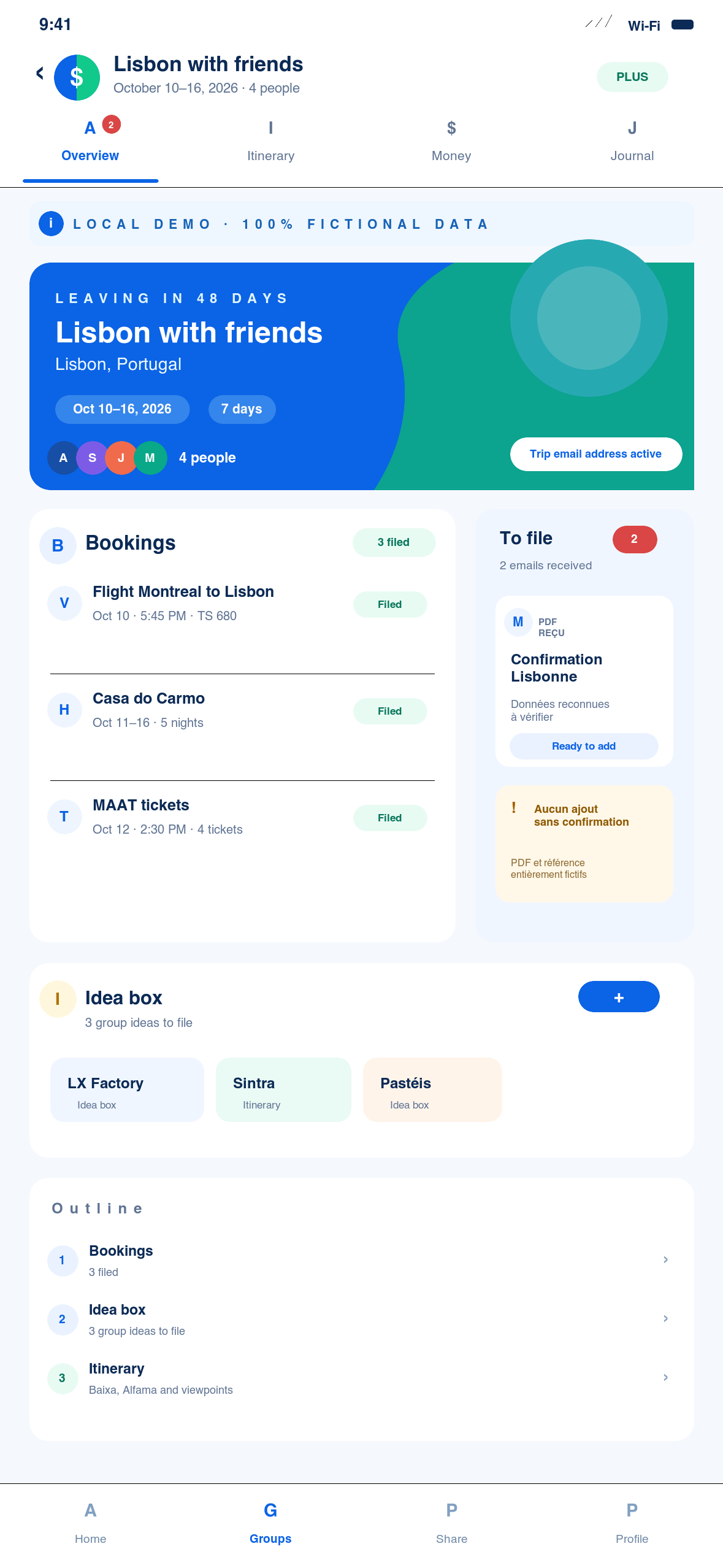
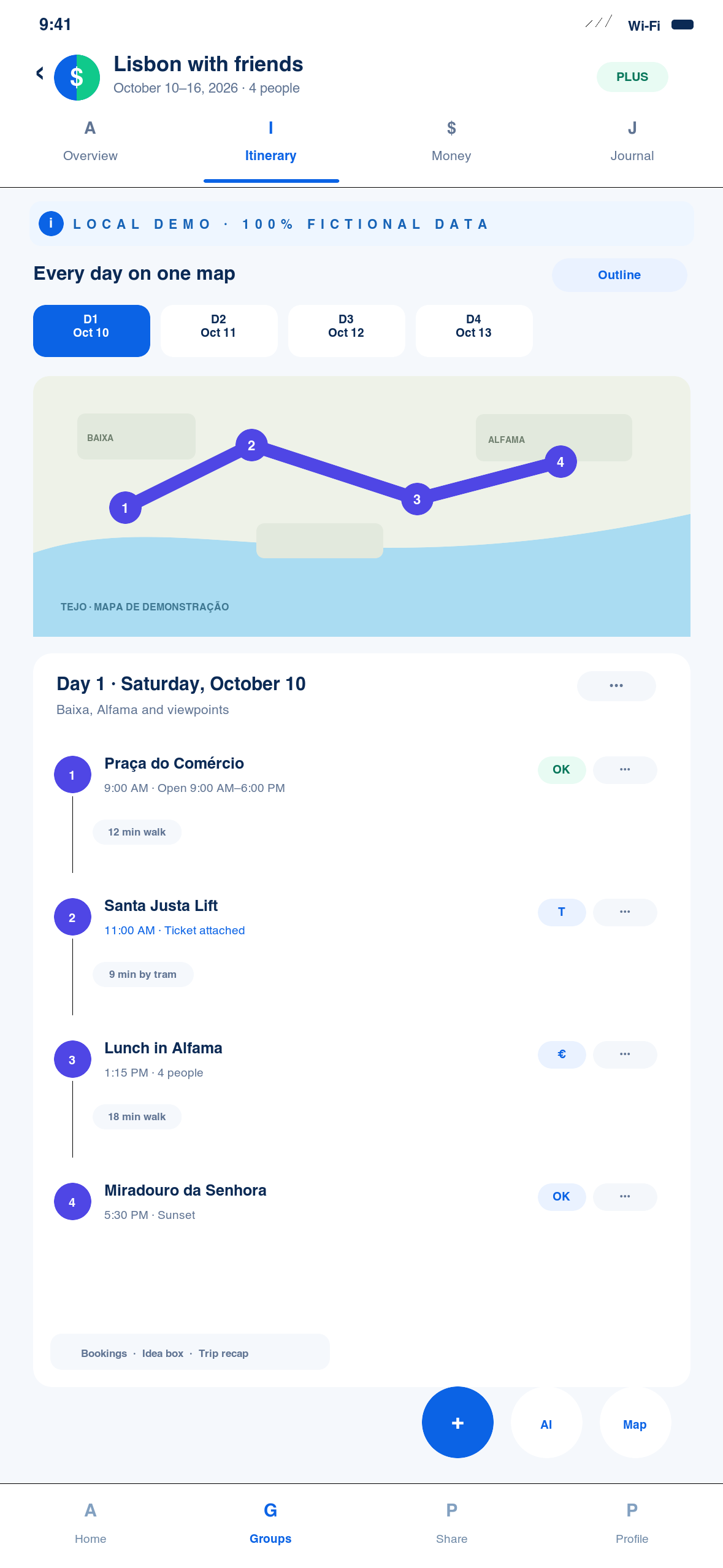
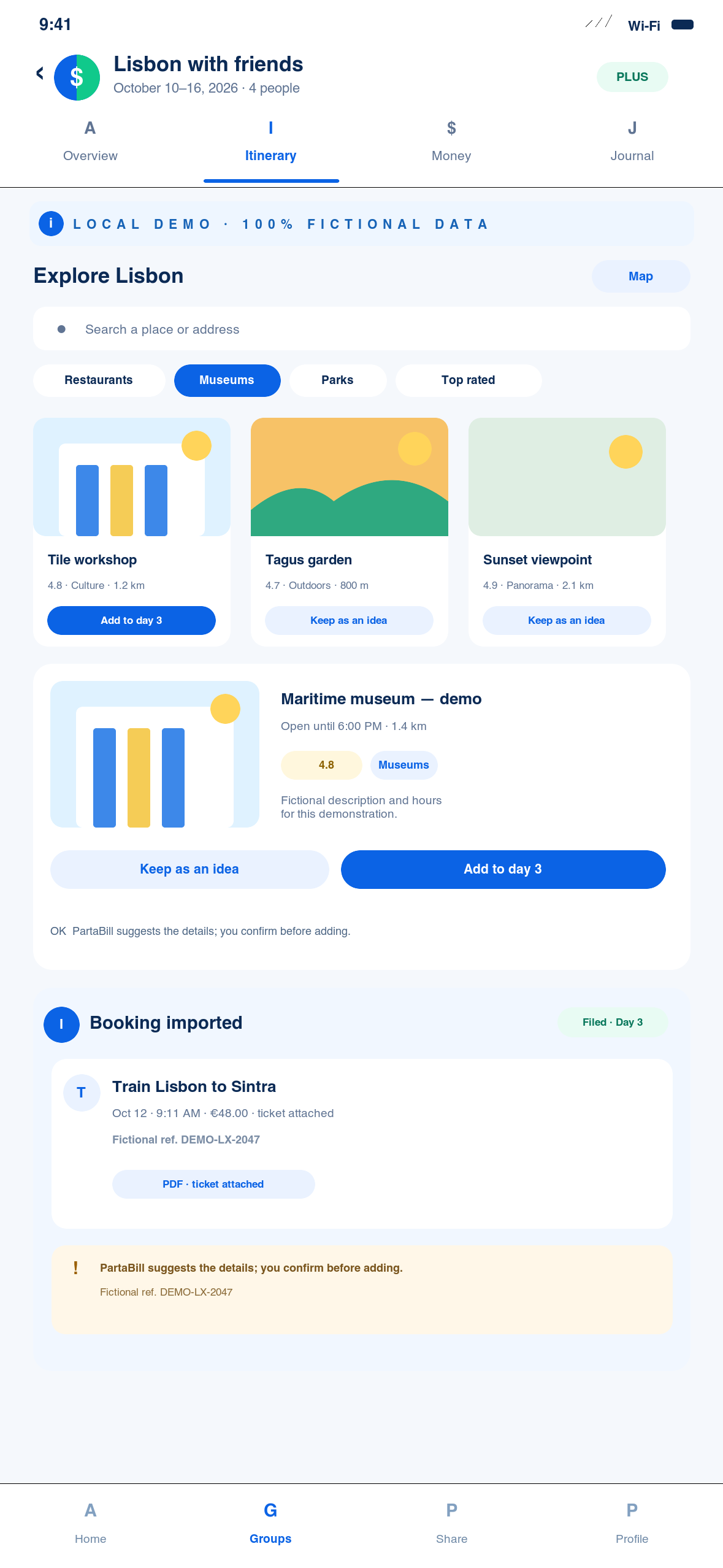
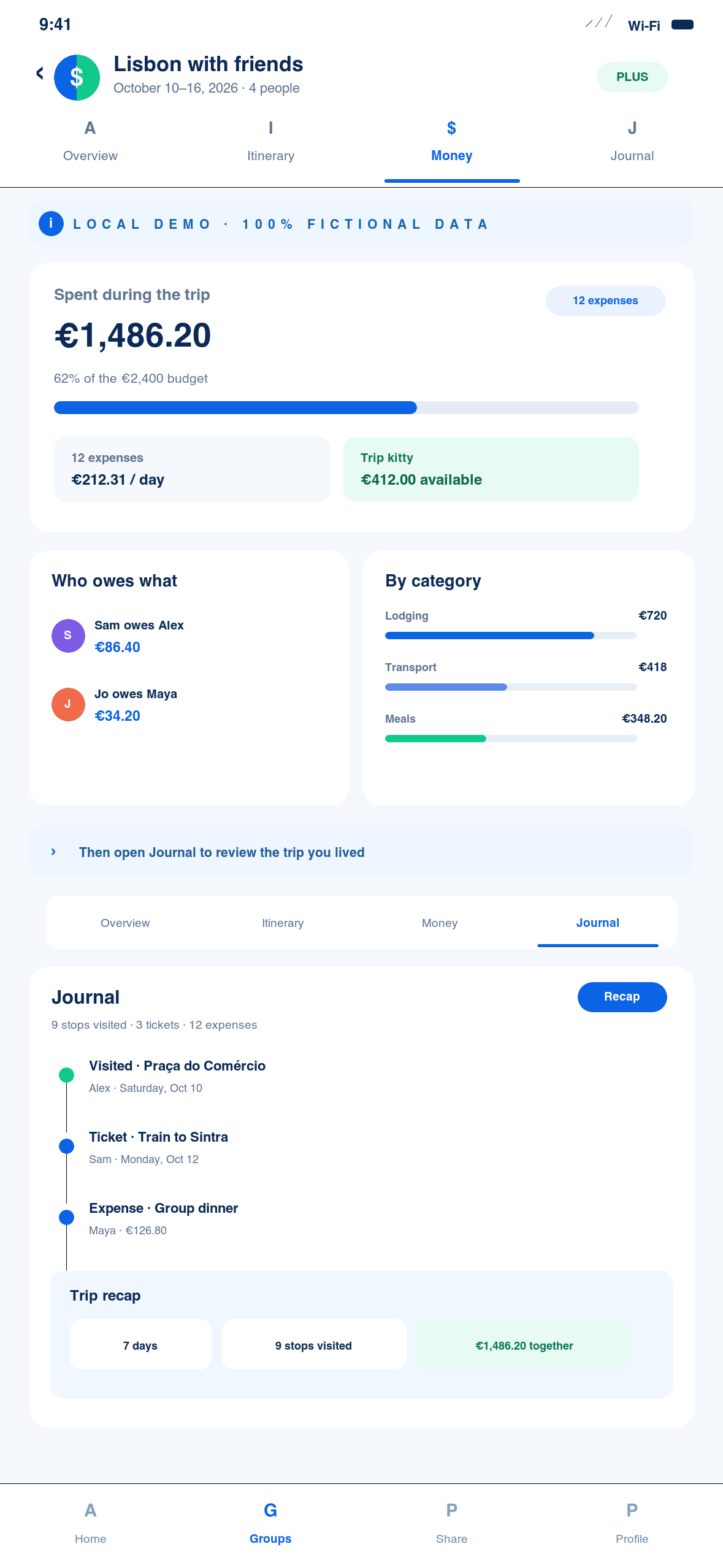
A fictional Lisbon trip opens in Overview, where dates, bookings, tickets and items to file appear together. The organiser then moves through the continuous itinerary and map, explores places and files a fictional confirmation. The group reviews trip expenses in Money. After departure, Journal brings visited stops, tickets and a shareable recap together without making a booking or payment.
Annotated screenshots
The 20-second answer
PartaBill now brings the map, itinerary, ideas, bookings and the group’s real expenses into one trip. Four tabs organise the experience: Overview shows what still needs attention, Itinerary builds each day on the map, Money tracks the linked group’s trip finances, and Journal records what was actually visited after departure.
Availability — early access. The new Trip planner is not yet open to every account. This guide documents its new design now; people without early access continue to use the current public Trip workflow.
Choose a suggested destination, confirm the dates and link the correct group. The organiser builds the plan; authorised members with permanent accounts can view it, comment on stops and vote according to role. Guest profiles without accounts remain read-only. Transport, accommodation and activities are still booked with their providers. PartaBill files confirmations, attaches tickets and may suggest an expense, but never books or pays on your behalf.
The four screenshots and video use a fictional Lisbon trip created locally, with no real booking, active link or personal information.
Who this guide is for
This workflow suits friends, families, couples travelling with others and small teams that do not want maps, times, confirmations and money scattered across several apps. It is particularly useful when people arrive at different times, share rooms, pay in advance or skip some activities.
The new design connects planning with the trip as it happens, rather than stopping at expense splitting. It does not replace a travel agent, official advice, provider terms, identity documents, medical guidance, insurance or emergency services.
Before you start: access, Plus and roles
The new planner and its AI features require personal Plus for the person who creates and edits the trip. A valid legacy Travel Pass may still cover some features of the linked group, but it does not replace the personal Plus required to create the plan, run AI or analyse a booking.
| Action | Access verified on 23 August 2026 |
|---|---|
| Create and edit the new Trip plan | Personal Plus and a permanent account |
| Explore, fill or optimise with AI | Personal Plus and an Internet connection |
| View a linked trip, comment and vote | Authorised members with permanent accounts, according to role; guest profiles without accounts are read-only |
| Edit the itinerary and file ideas | Trip organiser |
| Display Money | Trip linked to a financial group |
| Display Journal | From the trip’s start date |
| Analyse confirmations | Personal Plus; anti-abuse limits shown in the app |
| Share a PDF, image or text to PartaBill | iPhone or Android with a compatible native version; one file at a time |
| Annual PartaBill Plus | Canadian reference: CAD $9.99 per year, with a seven-day trial if eligible; the store price controls |
Recent Trip groups also retain their member rule: four registered people, including the owner, can use the free group features; adding a fifth requires Plus for the owner. That group limit is separate from the personal Plus required for the planner.
The complete PartaBill workflow
1. Create and link the trip
Enter a clear name, dates and destination, then choose the suggestion that matches the intended city or region. This gives the plan its position and context; an ambiguous name may put the map in the wrong place. A plan can span 1 to 30 days, with up to 50 stops per day.
Link the trip to the group that will pay and coordinate. Money can then reuse the group’s members, expenses, balances, kitty and currency instead of creating a second set of accounts. Check that you selected the correct group before inviting participants.
2. Understand Overview
Overview answers “what still needs preparing?”. It brings together the destination, dates, countdown, linked group, summary, bookings, tickets and received items awaiting a decision. A To file row means a confirmation has not yet been connected to the right day or stop.
Use it to spot a night without accommodation, an arrival without local transport or a ticket with no file. An alert is a reminder, not proof that a provider confirmed or changed a booking.
3. Build Itinerary and the map
Itinerary shows all days continuously instead of hiding the trip behind a filter. The day rail acts as an outline: select a date to reach its section, then scroll to understand the complete pace. Stops are numbered and colour-coded by day on the map.
Give a day a subtitle, such as “Belém and the Tagus waterfront”, then arrange transport, accommodation, activities and meals realistically. Places without coordinates can be positioned on the map; until then, they are excluded from route calculations.
The expanded map keeps a floating itinerary list. PartaBill can calculate segments and help order stops in supported modes. Optimisation requires at least three positioned places and currently accepts up to 27 stops when driving or walking, and 10 by bicycle. Public transport is not supported by this optimisation.
4. Explore, use AI and file ideas
In Explorer, search for a place, open popular locations or browse 49 categories in six families. Where providers supply them, a card may show a photo, category, opening hours, address, reviews and external links. Always confirm hours and conditions with the venue because commercial information can change.
Keep an uncertain option in the idea box so the organiser can assign it later. Members cannot file ideas themselves in the current interface. An activity suggested by an external partner opens with that provider; PartaBill does not make the booking.
The AI assistant can fill one day or empty days, add places or suggest a reordering. It explains up to four actions and waits for Apply. Check dates, duplicates, distances and closure days, and use Undo immediately if the result does not work.
5. Import and file bookings and tickets
Bookings can always be entered manually. With Plus and a connection, PartaBill can also analyse text, a URL, PDF or image, depending on the platform. System sharing on iPhone and Android requires a compatible native version and handles one file at a time; Wallet and ICS files are not yet accepted through this workflow.
Each trip can receive a unique email address. Forward a confirmation from a recognised address, then check the result under To file. The system can identify a flight, accommodation, train, car or ticket, avoid some duplicates, create the stop on the right day and attach the document. Unknown senders and ambiguous extractions remain for review instead of being silently filed.
One message can contain up to five attachments of about 25 MB each, and the inbox can retain up to 50 open items. Anti-abuse limits apply per trip and account; the app tells you when to wait before another analysis. A confirmed technical failure may be removed from the quota.
A ticket linked to a stop remains available from Overview and the stop details. If an amount is detected, PartaBill may offer to prefill an expense. Select the participants and currency, then confirm explicitly. Nothing is booked or added to the accounts automatically.
6. Track Money during the trip
Money appears when the trip is linked to a group. It includes expenses dated within the trip and shows the total, daily pace, budget target, categories and balances. It can also open the group’s kitty, local currency and settlement workflow.
PartaBill calculates who owes what but never connects to a bank or transfers money. Keep the original amount, review exchange rates and confirm reimbursements only after payment occurs. Do not split an optional activity across the whole group by default.
7. Use the trip while travelling
A stop card brings together its details, discussion, ticket, possible cost and Visited status. Authorised members with permanent accounts can comment and vote according to role; only the organiser edits the plan. A visit marked on mobile can queue while offline and synchronise later.
The map uses Apple Maps on iPhone and Google Maps on Android and the Web. These are online maps. Open the trip and prepare useful data before departure, but keep an independent copy of essential tickets and information.
8. Review Journal and share the Recap
Journal appears from departure and provides a read-only record of visited stops, dated tickets and expenses. It is neither a photo album nor a free-form notebook; use it as a factual trip history.
The shareable Recap combines days, visits, tickets and money from the linked group. Review totals before sharing: the current version may include group expenses outside the trip dates. It is not a bank statement or proof that a reimbursement occurred.
Group tools that complete the trip
The linked trip can use the group’s lists, shared and personal packing, tasks, decisions and documents. Assign shared items, keep private medication off shared lists and upload only documents that every authorised member needs.
For a cycling day, the route can use the dedicated bicycle engine and connect with the Bike touring log. An export to a mapping app or roadbook remains a copy; always check works, closures, conditions and current schedules in an appropriate source.
On iPhone and Android, an offline pack can retain up to 200 MB of prepared data, including the plan, selected group data, visits and documents. It does not download map tiles. The Web, Explorer, AI, imports, email and synchronisation require a connection.
Limits, privacy and provider information
- PartaBill does not book transport, accommodation or activities, track flights live or transfer money.
- The organiser edits the itinerary; covered members view, comment and vote without real-time co-editing.
- There is not yet a public read-only link for sharing the whole plan with an outsider.
- The trip address processes forwarded email; PartaBill does not scan a Gmail inbox automatically.
- Journal contains no photo album or dated free-form notes.
- AI, recommendations, hours, reviews, currencies and extractions can be wrong or unavailable.
- Partial mobile offline access does not download maps; the Web and automated processing need Internet.
- Documents and discussions follow group access, so share only necessary information.
Check official travel advisories and the documents required for every traveller’s citizenship. Review medical and interruption insurance, exclusions and planned activities. For accessibility, confirm dimensions, assistance, medication, service-animal and transfer requirements directly with carriers and accommodation providers.
Frequently asked questions
Which features are free, and which actions require Plus?
The group core includes expenses and selected tools within the allowances shown in the app. The new planner, its creation and editing, Explorer, AI and confirmation analysis currently require personal Plus. The price displayed by the store controls.
Who can edit the itinerary?
The organiser builds and edits the plan. Authorised members with permanent accounts can view it, comment on stops and vote according to role; guest profiles without accounts are read-only. This avoids conflicting changes, but it is not real-time co-editing.
How can I import a booking, and which formats are supported?
Use manual entry, the trip email address, or analysis of text, a URL, PDF or image. Mobile system sharing requires a new compatible binary and handles one file. Review the item under To file afterwards. ICS and Wallet files are not yet supported in this workflow.
Does PartaBill book or pay on my behalf?
No. It organises the plan, confirmations and declared expenses. Bookings, cancellations, insurance and real transfers remain with the chosen providers and payment services.
What remains available offline?
Selected prepared data, documents, checkmarks, visits and entries remain available or can queue on iPhone and Android. Offline maps, Explorer, AI, email, imports and the Web require a connection.
Are opening hours, reviews and place suggestions guaranteed?
No. They depend on providers and may be missing, old or changed. Confirm hours, conditions, accessibility, prices and booking requirements with the official source before travelling.
What exactly does Journal contain?
Journal shows stops marked Visited, linked tickets and dated expenses. It does not currently create a photo story or free-form notes. Review its Recap if the group also contains expenses from outside the trip.
Does PartaBill replace Wanderlog?
The products cover much of the same planning territory, but their strengths differ. PartaBill directly connects the map, itinerary and bookings with real group accounting, including a kitty, settlements and Bike touring workflows. According to Wanderlog’s official FAQ, Wanderlog currently retains advantages in co-editing, public sharing, Gmail scanning, offline access and photo stories. Choose according to your group’s needs rather than assuming perfect parity. PartaBill authored this guide and is not affiliated with Wanderlog.
Evidence, sources and verification date
The features described here were verified on 23 August 2026 in the code and 120 targeted tests for the new Trip design intended for Web, iOS and Android. They have not yet been validated as a public experience across all three platforms or on physical devices. Sharing to PartaBill through the system share sheet requires a compatible native version; partial offline access applies only to iPhone and Android. This guide is being published during early access; its content must be rechecked when the Trip client opens to everyone and the workflows have been validated on all three platforms.
The Canadian reference for annual Plus is CAD $9.99 per year, with a seven-day trial if eligible. The price, currency, taxes and trial eligibility shown in the App Store or Google Play at purchase time control.
General recommendations come from official Canadian sources. They do not replace destination requirements, professional advice, provider terms or the needs of each traveller.
First version assisted by AI; research and final review by Denis Turbide.
Continue with PartaBill
Create the trip, select the destination precisely, link the correct group and add one realistic first day. Then open Explorer, keep uncertain options in Ideas and file every confirmation before departure. The group gains a shared map, reviewed bookings and accounts connected to the real group.
Call to action: plan your next group trip with PartaBill on iPhone, Android or the Web once the new planner is open to your account.
Related guides
- Compare PartaBill, Splitwise, Tricount and Settle Up to choose the right shared-expense tool.
- Learn how to create a custom group with AI before tailoring its tools.
- For a trip on two wheels, read the complete guide to planning a group bike tour.

About the author
Denis Turbide
creator of PartaBill
Revision history
- — Initial publication
Sources and verification
- PartaBill — organise and track a group trip Facts verified: August 23, 2026
- PartaBill — complete feature catalogue Facts verified: August 23, 2026
- PartaBill — support centre Facts verified: August 23, 2026
- PartaBill — current terms and Plus offers Facts verified: August 23, 2026
- Financial Consumer Agency of Canada — Making a budget Facts verified: August 23, 2026
- Government of Canada — Traveller's checklist Facts verified: August 23, 2026
- Government of Canada — Travel advice and advisories Facts verified: August 23, 2026
- Government of Canada — Travel health and interruption insurance Facts verified: August 23, 2026
- Government of Canada — Registration of Canadians Abroad Facts verified: August 23, 2026
- Government of Canada — Travelling with disabilities Facts verified: August 23, 2026
- Wanderlog — official FAQ for sharing, Gmail and offline access Facts verified: August 23, 2026
Try PartaBill with your own group
Create a group, add an expense, and see what PartaBill can simplify for you.